Zebra Plastic Card Printers.

Zebra Plastic Card Printers come in a variety of styles and price ranges, including single-sided printers, dual sided printers, and security printers

Healthy Solutions for Healthcare.

The healthcare industry benefits from barcoding. Barcoding enhances patient safety and operational efficiency.

Seagull Scientific Products

Seagull Scientific BarTender is an industry-leading label design and barcode software. Seagull Scientific also develops true Windows printer drivers for bar code and thermal printers.

MC 9190G

The Ability To Satisfy Your Company Software Requirements.

Wireless Broadband

The unrivalled Motorola portfolio of Point-to-Point (PTP), Point-to-Multipoint (PMP), and Mesh Wide Area Network (MWAN), WLAN and VoWLAN solutions make governments, enterprises, and service providers more agile by helping them deploy voice, video, and data applications right where they need them.

Friday, 16 March 2012

Teamwork Retail Website is Now Live! - The POS of Your Dreams


The One Step Team is very excited and proud to announce
the launch of our dedicated Teamwork Retail website.
Teamwork Retail is a Cloud-based Retail Management
System.

Teamwork is poised to become the top point of sale for
retailers across the US. Top of the line mobile POS, cloud
based, Software as a Service, iPad compatible, subscription
based, franchise management, customizable reporting and
much more, this product has it all.

This site is fully set up to answer your questions and give
you a firm feel for it’s capabilities and features.

http://teamworkretailusa.com/

How to put your POS to work - POS Features and Integration Study #1 – Marketing

We just recently surveyed the action sports industry and
found that 48% had either no system for customer
management or have not put their existing system to use.

A few years ago we surveyed our retail clients and asked
them what their plans were to market to their existing
customers for the holidays. We were shocked to find that
almost 40% had no plans to do special holiday marketing
to their existing customers and 64% had no customer
loyalty program of any kind. Almost 60% said they had
no idea how to market to their customers using their POS
system. This was something that we set about rectifying
quickly for our clients and we want to share our tips for
success with you.

Your investment in your existing POS system can only
show a return if you learn and utilize the things it can do
for you. So we ask, what tools do you ALREADY have in
place that can help you effectively market? One Step
Retail Solutions, VP Sales, Kevin McAdam has some
tips and information for retailers everywhere.

“Of all the retailers I have talked to over the last couple
of years, ignoring the marketing potential of your
customer base is among the most dangerous decision
you can make in your retail business. Capturing it and
leveraging it is among the best.’

“Many retailers I talk to do virtually zero marketing
because it’s so expensive and because they see so little
measurable return from it. That’s often because it’s
shotgun marketing.”

So how do you AVOID shotgun marketing, how do
you make your efforts pay off?

“Marketing today is getting more and more precise
and as an independent retailer you need to be riding
that cutting edge to stand out. Let’s take a look at
Facebook and how they market to their members.
They know your profile (likes, dislikes, where you go,
what your hobbies are) and so they put advertising
on your sidebar that they know will have the highest
probability of catching your attention.” You could say
that the key to effective marketing is knowing your
client base and their needs.

So how does one find out their needs? How does one
leverage that information in a small to medium size
retail shop without spending thousands of dollars in
research and marketing campaigns?

“First of all, hopefully you have a robust POS system
that can hold large amounts of information about your
customers, because this is literally your gold mine.
Studies have shown over and over again that it costs 5
times as much in marketing dollars to get a new
customer as it does to re-sell to an existing customer.
It’s easy to understand: someone who has already
bought from you knows where you are and what inventory
you carry and, given good customer service, would buy
from you again. You just need to stay in touch with them
and offer them things you know they will buy. (This is why
Customer Loyalty programs work and yours should
definitely marry up with your POS system.)”

Please note that this is as vital for small and medium size
retailers as is it for the big box stores. “Now you need to
collect the information. Usually it’s as easy as telling the
customer that you make special offers to your regular
customers and then offer to put them on that list. Get as
much information as you can, street address, email (assure
them you don’t let anyone else use their email address),
home phone, cell phone (ask if they would like to be text-
messaged if there’s a really hot sale on something you know
they might like) birthday, sizes, color preferences, family
members….anything that you think might help you
promote to them. It might not make sense to try to get all
this information at one time, but sales clerks should try to
help build their ‘profile’ within your POS system” As a side
note, you can also create a sign that has “Follow us on
Facebook and Twitter” and “Check in on Yelp”. Facebook
contact data has become as relevant as an email address or
mailing address.

Marketing ideas made available by having a solid directory
of clientele in your POS system:

- Hopefully your POS system will not only keep a record of
that customer but also the record will show everything they
ever bought from you. This should be an available
customization in your POS. This way, the next time you get
a new item from the designer they have purchased before,
you can easily pull up the list of all customers that buy that
designer and email them that there’s a new shipment in
the store.

- You might even want to have a wine and cheese party to
kick off a new line and invite all the customers that have
bought similar categories in the past, let them know they
can bring along a friend as long as they are added to the
guest list (with their contact data of course).

- For a men’s store, make sure you have their wife’s
contact information so that just before the customer’s
birthday you can email their wife alerting her to the fact
that you have all his sizes and favorite designers.

- For a jewelry store, make sure that you have the
husband’s contact information so that before major
holidays and birthdays you can alert him to an
exclusive sale or offer.

- Reward customer loyalty. You can rank your customers
using the information in your POS system. You should
know which customers bring you the most margin, who
are the ones that buy the most at regular prices, who are
the ones that only buy when things are on sale, and who
are the ones that you make the most money from. Offer
exclusive deals, first pick or even host a invitation only
preview of your new season.

Don’t let it just be an expensive cash register! Learn it
yourself or have one of your employees learn at least the
marketing functions of the software and then put them
to work to increase your profitability.

“I think one of the most important things you can do as a
retailer in today’s marketplace is stop the old shotgun
wasteful marketing and get on the sophistication band-
wagon to precisely market to precise customers that you
want back in your store and that you know will appreciate
and buy the wonderful merchandise you work so hard to
provide.”

If you would like more information on our POS solutions
or for a free POS consultation please contact Amy Hanson
at 818.543.4777 ext 4116 or email

Thursday, 15 March 2012

Strong accents at SITL Europe

Date: 27.-30. March 2012
Place: Villepinte, Paris, France
Hall: 8
Booth: T085

TSC Auto ID EMEA Technology GmbH will be presenting two current product developments that set new benchmarks not only in performance and functionality, but also in price. The Alpha-3R mobile direct thermal printer and the ME240 industrial high-performance printer have numerous standard features that simply cannot be found in comparable models from the competition, or must be purchased as options.

"The robust ME240 4-inch printer that we are presenting at this logistics conference to the European and in particular of course to the French public in different presentations is not only the smallest thermal transfer printer in its class, but also the one with the most attractive price and the most flexible," says Frédéric d'Orsay, Sales Director Southern Region at TSC Auto ID. The rugged cast aluminium printer module can easily be removed from its all-metal housing, making it suitable for mounting under the table if there's no space for it in close situations. By default, the compact high-performance printer has serial interfaces including USB 2.0, an LCD display, and a real-time clock. 8 MB DRAM and 4 MB Flash memory ensure sufficient storage capacity even for the most demanding of multiple print tasks.

Simultaneously robust and powerful, the super-light Alpha-3R, weighing in at only 550 g, also offers the best price/performance ratio and best price in its class. The mobile power package scores high on print width and interfaces, and its 7.4V/2500 mAh battery also beats out the competition. Another highlight: With a maximum print length of 2286 mm, the Alpha-3R prints more than twice as much as competing products - at a print speed of 100 mm/sec and a resolution of 203 dpi.

Strong performance features and faster ROI
The requirements of the market and the needs of users are always the basis for the development of new product series at TSC Auto ID. Frédéric d'Orsay sees it as a decisive success factor that "our economical and very flexible marking solutions amortize very quickly. ROI is reached rapidly."

TSC Auto ID provides its distributors and resellers with a large selection of powerful and simultaneously reliable products at low prices, addressing a variety of requirements in industry, logistics, transport, trade, and even in healthcare. Frédéric d´Orsay says, "They can usually be integrated into existing structures with no problems by our partners and system integrators. To make sure that stays the case, TSC Auto ID provides its partner with constructive support and practice-oriented training."

Explosive growth and ambitious goals in 2012
At SITL Europe, two very important partners of TSC Auto ID for the French market are therefore present: Bluestar and Accuscan. "Together, we want to hit the ground running in 2012 and address vertical markets in the years to come," says Frédéric d´Orsay, in reference to the company's strategy, among the seven largest providers of auto ID solutions in the world and already with 1.5 million devices placed on the market. "We're currently one of the fastest-growing manufacturers of printers in the world, and we want to improve even more this year." But this ambitious goal, says d'Orsay, "can only be achieved in perfect cooperation with our partners on-site."

For the French market, particularly for the logistics industry, SITL Europe is extremely important. TSC Auto ID is putting its best foot forward at the conference, and its booth T085 in hall 8 won't just show off its most innovative product developments, such as the ME240 and the Alpha-3R, but also its complete, very differentiated product range, which offers the right marking solution for every industry.

Wednesday, 14 March 2012

Tarantino Makes Downtown LA SPARKLE

Tarina Tarantino is poised to bring her colorful designs to a brand new flagship location and headquarters office on downtown Los Angeles' famous S Broadway. Broadway has a host of new tenants arriving over the next year, exciting for this old Hollywood mainstay.

This beautiful new building will house not only a "workshop" storefront where guests can watch their own one of a kind jewelry come to life but the upper floors will house their factory and headquarters. An intentional nod to the bygone storefront downstairs/management upstairs set up.

The second store will be utilized as a gallery space for artists. A fitting contribution by Tarantino to LA artists, given her self made success and status as an independent and true artist.

This wild haired designer and her Sparkle Factory will hit the Downtown Los Angeles scene in early Fall of 2012.

We look forward to Tarantino's continued success!
http://www.tarinatarantino.com

For information on mobile point of sale: www.teamworkretailusa.com

Tuesday, 13 March 2012

How To Get Sales Through Pinterest: For Retailers


Updated February, 2013 to include some recent updates.

With almost 15 million users and reports of retailers getting more sales through Pinterest than Facebook, Twitter and Google+ combined, Pinterest has become a relevant and important resource for retailers.

The question can be raised, HOW could a bunch of pictures result in sales at store level? And, HOW does one control what others will “pin”?


Here is some helpful data:
  1.  Pinterest is a virtual pin board. Shoppers can pin images through their mobile app (snap a photo and then tag) and also pin an image you find online (Facebook images can not be pinned) or "repin" from another person's boards. “Look at these shoes I found from Kate Spade!” or “Idea for upcoming baby shower, vegan vanilla cupcakes from XYZ Bake Shop!” These are typically images of items that the Pinner likes and wants others to know about (free promotion).
  2. In order to pin you will need to install a bookmarklet within your bookmarks bar. Directions are found on the Pinterest GOODIES PAGE
  3. A “Pinner” can then categorize these images by “boards”. Popular boards include fashion (by season or style), wedding ideas, party planning, recipes and interior design.
  4. You may wonder how this all could result in SALES? When one pins from a website the image then becomes an active link to the source of the image. Thus, promoting the actual product AND the origin site. Hopefully, the image of those cute pair of shoes was found on the website where those shoes can then be purchased. That is where the ROI kicks in.
  5. The biggest demographics of “Pinners” are women and many are between the ages of 20-35. Many are noted to be stay-at-home moms. Products that are targeted to that demographic will get the most response.
  6. There are several reports of independent shops, designers, Etsy stores and the like getting more
    traffic from Pinterest than Facebook, Twitter and Google+ combined.
  7. You will find that the noted image source (website) is a blog more often than not. Ideally the blogger notes where the items featured can be found. Thus, it is important that you get the ball rolling by ensuring your products have ample (and appealing) images on your website . Also by posting onto your pinboard the images so that they are getting repined from your site as the source.
  8. Pinterest was initially invitation only but more recently became available openly. 
  9.  It is recommended (as with all social activities) that you not only promote your product and services but be both personal and interactive. You should not only be likinging and repinning but also posting some fun and inspirational boards. The largest chunk of your social activities should be more about building a relationship and driving in additional interest through connections.
  10. Hashtags (#) apply in the same way that they do in Twitter and on Google+. Be sure to label your posts so that they can be easily found. (Example: #socialmedia #pinteresttip)
  11. You may want to include a "pin it" button within your product listings or add it to your blog or website - FIND BUTTONS HERE
  12. Pinterest now has a managing dashboard where you can schedule posts in advance. Known as Pingraphy you now have the ability to view statistics and schedule pins from an external dashboard.

Update as of Feb 2013

1. Many retailers and websites are now incorporating a "Pin it" button (or "widget") directly within their websites next to product images or an icon pops up when hovering over the image.
To guarantee pin-ability, include a "Pin it" button directly on your site so that a "pinner" can easily "pin" from anywhere.
This blog has a pink, glitter watermark that fits her branding perfectly.
Get widget codes: HERE

2. Tools to "pin-ify" your website or blog HERE
3. Be sure you make products available if they are becoming popular on Pinterest to avoid this issue.
4.  "Curalate, an amazing tool that (among tons of other features) uses image recognition technology to 'see' which images are being pinned, says that '48 percent of top retailers’ most popular products on Pinterest link back to expired pages.' Their CEO, Apu Gupta, raises a very important question: How much money are these brands leaving on the table?" - Social Media Examiner
5. Center a game or competition around Pinterest.
Click to expand

To learn more!
- Pinterest 101

- Webinar by WhizBang! Training on how to set up and use Pinterest for retailers

- 26 tips to fully utilize Pinterest

- Additional resources to help you manage your social media

This article was brought to you by One Step Retail Solutions a leading retail technology service provider and reseller.
Our Pinterest site includes pinboards with retail tips and important retail trends.


Monday, 12 March 2012

STMS configuration for a standalone SAP system (local transport domain)

This article answers the below queries
ü  How to perform STMS configuration of an SAP system (local transport domain)?
ü  How to do STMS configuration in the post system refresh steps of SAP system?
-----------------------------------------------------------------------------------------

Please use user id which has SAP_ALL access and login to 000 client of an SAP system.
Please execute transaction code STMS.
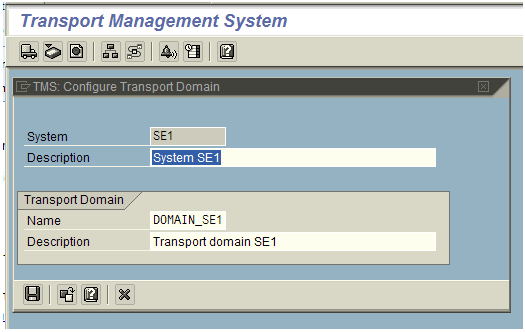
A screen similar to below will appear. Provide the description of the system.


In the above screen, Transport domain name will be displayed by default. (Naming convention would be DOMAIN_SID, where SID stands for system id of the system that is being refreshed)
In our example above SE1 is the system id and DOMAIN_SE1 is the domain.
In this example, am demonstrating on how to configure local transport domain for a standalone SAP system.
Click the Save button in the above screen.
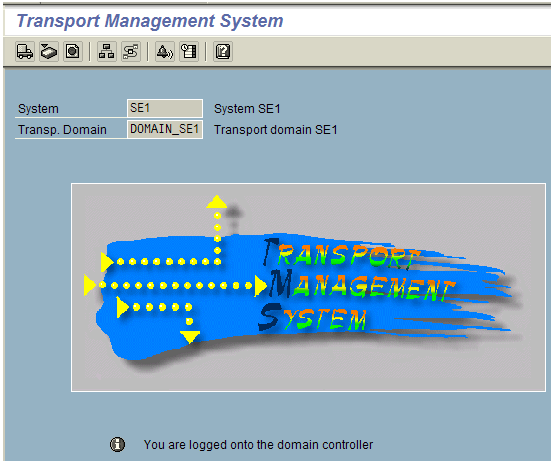
After that SE1 is configured as transport domain and a screen similar to below will appear.
An informational message will be displayed like “You are logged onto the domain controller”.


This completes the STMS configuration (local domain) for a sap system.

Please note that the above configuration is for standalone system. In case you would like to do STMS configuration for a system which is part of another transport domain, a slightly different process is to be followed which will be covered in a different article.

Related Links :
                          Deleting Transport Management System configuration


Friday, 9 March 2012

Point-of-Sale Solutions on an iPAD - Welcome to the Future


In the past few years we have seen hardware transform - touch screen phones, lighter than a book personal laptops, virtual changing rooms and cars that look like they belong in a Tom Cruise movie. It is certain that the future is here and it is everything that we imagined but way, way cooler.
POS software has continued to advance through the years and the various capabilities can help
guarantee the success of a store. We now have fat systems that do everything from inventory tracking to customer preferences and integrating with your vendors – a far cry from when you would just ring someone up.

Imagine the Point-of-Sale hardware of the future. You may have already seen handheld devices being used as mobile cashier stations; this is an advance for the retail industry for sure. This new concept not only boosts customer service and sales but will essentially drive customers IN, you are the future and your prospects and clients will want a bite of that.

When designing or redesigning a space you are looking for a complete package, you are upgrading the space AND the overall experience. Since every customer has to go through a checkout line… to get rung up… to get their paper receipt… you are looking at a part of the experience that may not be on par with the overall feel you are trying to create. We have had several clients include their POS upgrade as part of a new store launch or space upgrade with fantastic results.
Now imagine a whole system with futuristic, customizable and fully functional software AND hardware. Teamwork Retail is the future of POS: web-based Headquarters with Inventory Control, Purchasing and Receiving, Analytics, Management Reporting and Multi-Store Management all familiar and easily learned by staff in minutes, plus an in-store local PC or iPad POS that can double as an ad display when docked. … all from the Cloud for a low monthly subscription.
TeamWork Retail was created by the development team that has brought retailers the most innovative and effective Point of Sale systems in the world, having created solutions used in over 100,000 stores world-wide. Available only from One Step Retail Solutions. One Step Retail Solutions has been a leader in the POS solutions industry for the past 25 years, offering 5 unique POS solutions to guarantee the best fit for not only now but for your future expansion.

For more information on our two iPAD Retail Management Systems -
Teamwork Retail - www.teamworkretail.com
Lightspeed - http://mac-pos-software.com/ 

Thursday, 8 March 2012

Deleting Transport Management System (TMS) Configuration

This article answers the following queries:
Ø  What is the need to delete TMS configuration?
Ø  How to delete “local” Transport Management System (TMS) Configuration from SAP system?
Ø  What is the Tcode used to delete TMS configuration?
Ø  How to resolve “Local TMS configuration is inconsistent” issue in SAP?
---------------------------------------------------------------------------------

In some real time scenarios, it is required to delete TMS configuration from SAP system.
Scenarios could be like
i)                    If a Transport Management System configuration is inconsistent/not done properly in SAP system. You would like to delete and re-configure
ii)                  While performing system refresh activity, TMS configuration to be done as post refresh steps. For example source system SID is different from target system SID. So old configuration need to be deleted and new TMS configuration to be done in the name of new SAP system.  
So, Basis consultant should be able to delete the existing TMS configuration. The process for the same is mentioned below

Transaction code SE06 need to be used for deleting TMS configuration and the deletion should be done from 000 client using DDIC user id /any user id having SAP_ALL access.


If you are performing this activity, after a standard SAP installation, then option 1 to be selected. If you are performing this after Database copy (i.e. System refresh or database refresh) or database migration activity, then 2nd option in the above screen to be selected and “Perform Post-Installation Actions” push button to be pressed.
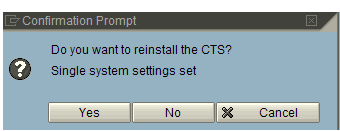
After this, system prompts below screen.


Click Yes. This results in below screen. Please input proper source system from which system refresh is being carried out here. Most of the times, SID gets populated automatically. However, please enter it manually in case it was wrongly populated or if it is blank.


System again prompts you as shown below. Here it prompts that can I change originals from source system id(QE1) to target system id (SE1) in  the below screen.


Click yes to proceed further.


Confirm the above screen


Please press Yes in the above screen.


Please press the Yes button to confirm deletion of TMS configuration.

Confirm this.


Confirm this to delete old versions of transport routes.


How to resolve “Local TMS configuration is inconsistent” issue in SAP?
If local TMS configuration is inconsistent,  then existing configuration to be deleted as mentioned in the above article and TMS to be re-configured.

Please note: In this article, have covered only deletion of local TMS configuration. Configuration of TMS will be covered in a separate article.
After this a message appears on the status bar as below. It means existing TMS configuration is deleted and you can proceed to reconfigure TMS


Related Link :

STMS configuration for a standalone SAP system(local transport domain)

Wednesday, 7 March 2012

Applying sap license

This article answers the following queries :
ü  How to apply SAP license in a SAP system ?
ü  When to apply license for an SAP system ?
ü  How to delete an existing license of an SAP system ?
ü  What is the transaction code used to apply license in SAP ?
ü  Explain the process of applying license in SAP ?
ü  How to request an SAP license key ?
----------------------------------------------------------------------------------------------------

In SAP environment, there will be a requirement to install a license to a new installed SAP system or to a system refreshed from another system. This is the primary step in the post refresh activities of an SAP system.
SAP license key can be requested from Service Market Place from the following link :
Please download license key for a SAP system and store in your local desktop.
Once the license files are downloaded from market place, login into 000 client using SAP* user into  ABAP stack of an SAP system on which you would like to apply license.
SLICENSE is the transaction code for applying license in SAP system.
Execute transaction SLICENSE, which results in a screen similar to below


To  list  old licenses existing in the system, click on “Old Licenses” tab in the above screen. It lists all the old licenses.


Select each license and delete license by navigating as shown in above screen
Repeat this step until all old licenses are deleted.
To install new license click on install button  shown in the below screen


It opens screen as shown below. Please navigate to the location where license file that was downloaded from market place was kept in your desktop and select the file and click open to input the license file.


It then displays message as below after successful installation of license key.


Tuesday, 6 March 2012

Global Shop 2012 Rewind - Judge a Shop by it's Cover?

We just returned from Global Shop, a leading store design and at-store marketing convention in Las Vegas. The sheer creativity and resources available to retailers really got my creative juices going.

Retail is a sensory industry, you are selling products that can either be touched, worn, viewed, used, held, smelt, eaten or in some cases… all of the above. Somewhere between the operation and budget, the overall FEEL and IMPRESSION being created IN store can get lost. This is especially true for small to medium sized retail shops that sometimes do not have the wherewithal to pull off something “spectacular”. Regardless, a look and feeling that
represents and welcomes is highly important. MANY retailers nail this but some have a hard time with this.

Pretend like you have never walked into your store before and with fresh eyes start out a few yards away and start observing the space.
Walk in, take in the feel, the smell, do you feel comfortable? Do you feel like the arrangement of the displays is welcoming (slanted towards you), can you comfortably see (not too bright, not too dark), do the basic colors of the room attract you or detract you? Ask some of your frequent shoppers what they like most about the shop experience and find out if they feel physically welcome.

If you think of your shop like an outfit, putting together the right elements to pull everything together, with some strategic (and cost effective) upgrades you can revamp your whole store.