Zebra Plastic Card Printers.

Zebra Plastic Card Printers come in a variety of styles and price ranges, including single-sided printers, dual sided printers, and security printers

Healthy Solutions for Healthcare.

The healthcare industry benefits from barcoding. Barcoding enhances patient safety and operational efficiency.

Seagull Scientific Products

Seagull Scientific BarTender is an industry-leading label design and barcode software. Seagull Scientific also develops true Windows printer drivers for bar code and thermal printers.

MC 9190G

The Ability To Satisfy Your Company Software Requirements.

Wireless Broadband

The unrivalled Motorola portfolio of Point-to-Point (PTP), Point-to-Multipoint (PMP), and Mesh Wide Area Network (MWAN), WLAN and VoWLAN solutions make governments, enterprises, and service providers more agile by helping them deploy voice, video, and data applications right where they need them.

Thursday, 7 June 2012

Introducing: Apparel POS, Our Newest Website


One Step Retail Solutions is more than proud to announce the launch of our newest website www.Apparel-POS.com A striking and modern website design that quickly gives you a firm understanding of who we are, what we do and the leading retail management systems available.

Please take a look at our in-depth pages on retail software solutions, hardware options, services and how to easily find out more.

This website is a must for the high-end, multiple location or up-and-coming retailer.

USPS Postnet Expiration Deadline Draws Near

by Nate Schubert

At this point, the Intelligent Mail barcode symbology has been accepted for years by the United States Postal Service for automation price eligibility. Several due-dates have come and gone and while the USPS has worked hard to phase out the former standard Postnet, it has been slow-going. The Postal Service has seen this transition process slowed as a result of working through their own fiscal shortcomings as well as allowing business owners from around the nation to put the proper processes in place so that they can begin using Intelligent Mail.

The US Postal Service website has finally proposed a discontinuation of the Postnet barcode effective by January 28, 2013, and it looks like this is a date that is going to stick. Business owners who receive automation pricing discounts have been scrambling for years to get in line with the latest standards, but as the USPS strives to stay viable with a new 5-year strategy moving forward, it is going to be even more critical for businesses to meet this January 2013 deadline or risk missing out on deep mailing discounts.

IDAutomation has worked to provide businesses and individuals alike with Postnet and Intelligent Mail barcode printing capability. Our products combine the Postnet and Intelligent Mail barcode types, making it possible to generate Intelligent Mail barcodes with Postnet. So, while Postnet may well become a thing of the past in the eyes of the USPS, IDAutomation products will continue to meet both needs with a single product.

The single most popular product IDAutomation provides for generating these postal barcodes is the Postnet & Intelligent Mail Barcode Font Advantage Package which can be used within a wide variety of programs and environments. This increases flexibility for businesses which in turn decreases cost in terms of discounts and time spent. Now is the time to put your plans in place for receiving these automation discounts as offered by the USPS, and we are happy to help make this transition as easy as possible for all businesses who benefit.

Wednesday, 6 June 2012

New Firmware Release

We are pleased to announce the new firmware V6.95 release. For more detail modification, please visit our website by (http://www.tscprinters.com/cms/theme/index-39.html)
Please be reminded if your firmware version is below V6.88, the downloaded files in flash memory will be deleted and you will also need to re-install the driver again if printed by USB connection. After upgrade the firmware to V6.95, no matter which USB port is connected, PC will not prompt to re-install the driver.

[Guest Article] Taking Your Organization Global is More Than Just Translation

Taking Your Organization Global
More Than Just Translation


In today’s global economy it is more imperative than ever before to make sound decisions based on research and best practices before taking your organization global. As the prospects for continued growth diminishes in the United States and Europe, companies must look to other regions, such as the Middle East and China, for future growth, brand development, and profits.

Preparation, as well as the knowledge and acceptance needed to truly embrace another culture, are critical if you don’t want to waste money and/or make a fool of your company and product. This means that not only do you have to professionally translate all your company’s materials--from HR and marketing to the software that may drive your product--but you must also acquire the cultural awareness related to every aspect of your company’s internal and external messaging, This messaging also includes your employees’ behavior.

Consider how long it took you, how many meetings and how many technical writers, perhaps even focus groups, to craft and hone your company’s message and image.  Take the same kind of care with your selection of a translation company because your target customers will only see the translation, not the original.

There are 5 key cultural factors to keep in mind when planning for international expansion:

·        When in Rome… – Make yourself aware, region by region, what the behavioral norms are, so as not to offend people from the host country. For example, never use your left hand to serve yourself in a Muslim country; do not expose the sole of your shoe when sitting down in the Middle East, and in Korea be prepared to socialize into the night as part of ramping up to negotiations. 

·        Managers Need Help Too – Global employees need tools that allow them to maneuver among cultures.  Making them aware of the 7 cultural dimensions that constantly come into play is a good place to start.  See Cultural Dimensions Theory

·        Negotiating Across Cultures - Buying and selling across cultures requires a set of skills that probably are different than what you’re used to. Training employees and helping them become attuned to the cultural subtleties the other side expects when engaged in negotiation is key. For instance, in many cultures discussion of price is never the first consideration. Whereas with Americans, price is typically the opening salvo.

·        Don’t Break the Speed Limit - Communicating with people who come from a culture where hierarchy is strong, directness is avoided,  and time management is non-existent represents its own set of challenges. Adjust your communication pattern to click with your interlocutors.

·        First Impressions Matter - The way we dress, the way we sit, the way we shake hands sends a specific message. Think of your first meeting as a job interview and get this opening impression right.  Across cultures, it is of utmost importance to play the part and display the correct level of respect through non-verbal cues.

To be sure there are many other facets of taking your organization global but an understanding and implementation of the key points listed above will benefit you in countless ways.


Jeff Williams
PTIGlobal
Email
Website

Tuesday, 5 June 2012

Electronic Hangers and Social Media


An "electronic hanger" has been created and is in limited use by Brazilian retailer C&A. This hanger includes a simple touch screen where a person can "like" the item and create a running count of likes on an image of the picture on Facebook.

Currently in BETA this product has been sparking curiosity.

What do you think of this concept?


Image Source

Saturday, 2 June 2012

How to avoid “DEBUGGING IMPOSSIBLE” dump in ST22 of sap?


This article answers the following queries:

ü  What is debugger?
ü  What is debugging?
ü  What is the reason for “DEBUGGING IMPOSSIBLE” dump in ST22?
ü  How to avoid “DEBUGGING IMPOSSIBLE” dump in ST22 of sap?
ü  What is the parameter used to increase or decrease debugged sessions in SAP?
ü  Usually, in which role of sap systems, debugging can be done?
ü  How many dialog work processes can be in debugging mode in SAP as per recommendation in development systems?
ü  What is the reason for system performance issues, if large numbers of developers are doing debugging in an SAP system simultaneously?
ü  Is it suggested to perform debugging in production systems? If not, why?
-------------------------------------------------------------------------------------------
What is debugger?
The debugger is a programming tool that can be used to execute ABAP programs line by line or section by section. With this tool, you can display data objects and check the flow logic of programs.

What is debugging?
Debugging is the process of executing ABAP programs line by line or section by section. This process will be done usually by developers to analyze the flow and issues (like performance problems etc) in the ABAP programs.

What is the reason for “DEBUGGING IMPOSSIBLE” dump in ST22?
In real time scenarios, we may see dump like “DEBUGGING IMPOSSIBLE” in ST22 transaction of SAP as part of monitoring system.  Also, developers might have complained to Basis team that they are not able to debug in SAP system and while they are trying to do debug, they are encountering “DEBUGGING IMPOSSIBLE” dump. The short text of the dump says “ABAP programs cannot be debugged currently”.


So, it is responsibility of Basis administrator to avoid those dumps and help developers to debug in development systems.
Usually debugging will be done in development systems. It is not suggested to allow debugging in production systems as it impacts system performance because work processes that are in debugging mode cannot be used by other users.
Usually this dump occurs when the maximum number of work processes in debugging mode has already reached.

How to avoid “DEBUGGING IMPOSSIBLE” dump in ST22 of sap?

Please check the process overview (SM50 or SM66 transaction) and find out how many work processes are currently in debug mode.
The number of work processes that are available exclusively for debugging is defined by the profile parameter rdisp/wpdbug_max_no.
Please check this parameter value in a sap system and compare with the number of processes that are currently in debug mode. This dump occurs when the maximum of work processes in debugging mode has already crossed the parameter value set for rdisp/wpdbug_maxno.
So, it is suggested to increase the value of this parameter to avoid these dumps. This is dynamically switchable parameter and can be changed immediately and no need to restart SAP system for the value to take effect.

Note:  Please refer below link to understand how to increase/decrease an sap parameter value.
Details related to this parameter can be checked in Rz11 transaction which will be similar to as shown in below figure.


However, please note setting this parameter to a very high value leads to performance issues in SAP system, as “work process multiplexing” won’t happen if debugging is being done. That is work processes that are in debugging mode cannot be used by other users.  This reduces the amount of free dialog work processes, which affects system performance.
In development systems, this parameter should be approximately half the number of dialog work processes.

Hint :
Usually, as debugging is not suggested in Production systems, the parameter value rdisp/wpdbug_max_no is set to low value. Most of the times, when a development system is refreshed with production system, the number of debug sessions will be low in the corresponding development system as those values are copied from profile parameter of a production system. So, it is responsibility of basis administrator after system refresh to cross check this parameter value and set correct value as per the recommendations in the development system to avoid these dumps.


Friday, 1 June 2012

Welcome to June!

Summer is fast approaching and the weather is warming up (or in some cases, burning up). We are excited to enter a brand new month and continue to be at the forefront of the mobile technology boom with 4 leading systems with full mobile capabilities.

Fashion is bright and perky, technology continues to march forward and the year is nearly half over (already?!). If the J Crew window is any indication, this is going to be a sweet summer.

What are you looking forward to in the coming few months?


Wednesday, 30 May 2012

How to generate SAP solution manager key for the installation or upgrade process


This article answers the following queries:
Ø  How to generate SAP solution manager key for the installation or upgrade process?
Ø  What is the process to generate solution manager key for a new installation?
Ø  How to generate solution manager key from SMSY transaction?
Ø  What is the tcode used to generate solution manager key in SAP?

----------------------------------------------------------------------------------------------------
In a real time scenario, a basis administrator is required to install an SAP system or upgrade an SAP system.  As of my SAP ERP 2004 ( SAP ECC 5.0), an SAP solution manager key is required for installing and upgrading SAP software.
Therefore generating SAP solution manager key is one of the most important pre-steps of an SAP installation or upgrade.

SMSY is the transaction code used to generate a solution manager key for installing a new SAP system or upgrading an SAP system.

Login to ABAP stack of solution manager system and choose SMSY transaction. It results in below screen.


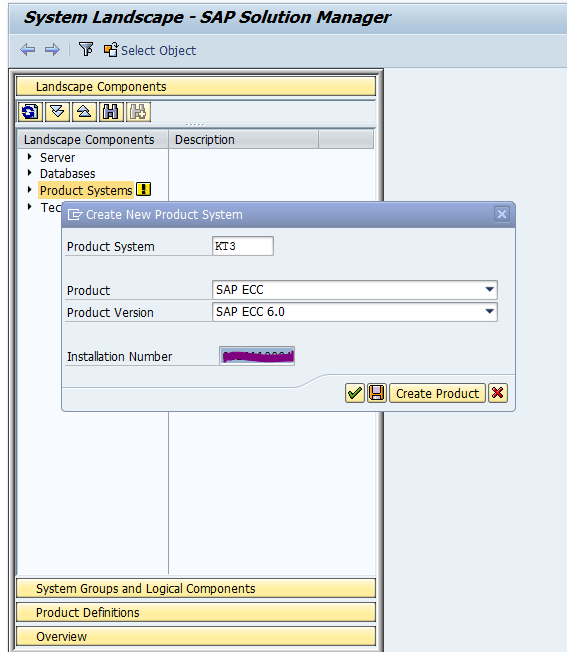
In the above screen, right click on “Product systems” tab and choose “Create New product System”. A screen similar to below will appear


In the above screen, please provide SID of the system and select Product type from drop down list . Depending on the SAP system being installed, please select the product type like SAP ECC or SAP CRM or SAP PI etc. Also select the product version and installation number of the product from the drop down list.
Once this is done, please click on save button. This creates a new product system as shown below.


In the above example, I have created a product system KT3, whose product version is SAP ECC 6.0.
In the above screen, please tick on the relevant products and click on save. After this, again choose SMSY transaction and navigate  to System Landscape -> Select object as shown below:

Once select object is clicked, a screen similar to below one will appear.


In the above screen, please click on key icon ( highlighted in the above screen).This results in the below screen


Please provide system number (i.e instance number) and message server hostname in the above screen and click on “Generate Key” pushbutton to generate the Installation/Upgrade key as shown in the above screen.
This particular key should be noted and specified in the installation or upgrade tool.


Tuesday, 29 May 2012

QR Code Functionality Now Available in ActiveX!

by Nate Schubert

For years, the process of enabling QR Code generation capability in ActiveX has been extremely complicated, and thus unavailable in IDAutomation ActiveX products. This has caused individuals to seek alternatives to barcode generation in environments where ActiveX would be preferred. The process for integrating alternative solutions can also be very complicated, however, which can leave customers wanting for a more flexible and easy-to-use solution.

After much hard work by our development staff, IDAutomation is pleased to announce that all ActiveX Components have been updated to include functionality for QR Code barcode generation. This high-demand update was released earlier this morning, and allows QR Code functionality in the following IDAutomation products:

Customers who have already purchased these products may purchase the one year Priority Support & Upgrade Subscription to receive download access to the latest version of this product, while new customers are encouraged to place their orders online. This is a long-anticipated upgrade to our ActiveX products that should provide increased flexibility and productivity for anyone who has a need to generate 2D QR Codes in an ActiveX environment. 

Point of Sale News Features One Step Article on Mobile POS

We are honored to have one of our recent articles features in retail technology hub Point of Sale News.

The concept of retailers transitioning to mobile is a hot topic but will take some time to see implemented broadly. Check out the article for more information.

Read here: Mobile Up - Retail Cowboy