Zebra Plastic Card Printers.

Zebra Plastic Card Printers come in a variety of styles and price ranges, including single-sided printers, dual sided printers, and security printers

Healthy Solutions for Healthcare.

The healthcare industry benefits from barcoding. Barcoding enhances patient safety and operational efficiency.

Seagull Scientific Products

Seagull Scientific BarTender is an industry-leading label design and barcode software. Seagull Scientific also develops true Windows printer drivers for bar code and thermal printers.

MC 9190G

The Ability To Satisfy Your Company Software Requirements.

Wireless Broadband

The unrivalled Motorola portfolio of Point-to-Point (PTP), Point-to-Multipoint (PMP), and Mesh Wide Area Network (MWAN), WLAN and VoWLAN solutions make governments, enterprises, and service providers more agile by helping them deploy voice, video, and data applications right where they need them.

Monday, 28 October 2013

Goodbye Sticky. Hello Ara.

Over the last six months, our MAKEwithMOTO team took Sticky, a truck wrapped entirely in velcro and filled with rooted, hackable Motorola smartphones and high-end 3D printing equipment, across the country for a series of make-a-thons. On that trip we saw the first signs of a new, open hardware ecosystem made possible by advances in additive manufacturing and access to the powerful computational capabilities of modern smartphones. These included new devices and applications that we could never have imagined from inside our own labs. Open fuels innovation. See some examples here, here, and here.

After the trip, we asked ourselves, how do we bring the benefits of an open hardware ecosystem to 6 billion people?

Meet Ara.

Led by Motorola’s Advanced Technology and Projects group, Project Ara is developing a free, open hardware platform for creating highly modular smartphones. We want to do for hardware what the Android platform has done for software: create a vibrant third-party developer ecosystem, lower the barriers to entry, increase the pace of innovation, and substantially compress development timelines.

Our goal is to drive a more thoughtful, expressive, and open relationship between users, developers, and their phones. To give you the power to decide what your phone does, how it looks, where and what it’s made of, how much it costs, and how long you’ll keep it.

Here’s a sneak peek at early designs for Project Ara:


The design for Project Ara consists of what we call an endoskeleton (endo) and modules.  The endo is the structural frame that holds all the modules in place. A module can be anything, from a new application processor to a new display or keyboard, an extra battery, a pulse oximeter--or something not yet thought of!

We’ve been working on Project Ara for over a year. Recently, we met Dave Hakkens, the creator of Phonebloks. Turns out we share a common vision: to develop a phone platform that is modular, open, customizable, and made for the entire world. We’ve done deep technical work. Dave created a community. The power of open requires both.  So we will be working on Project Ara in the open, engaging with the Phonebloks community throughout our development process, as well as asking questions to our Project Ara research scouts (volunteers interested in helping us learn about how people make choices). In a few months, we will also send an invitation to developers to start creating modules for the Ara platform (to spice it up a bit, there might be prizes!). We anticipate an alpha release of the Module Developer’s Kit (MDK) sometime this winter.

So stay tuned. There will be a lot more coming from us in the next few months.

--Paul Eremenko, and the Motorola Advanced Technology and Projects group, Project Ara Team

Hey, New York: Moto Tweet Fleet to the Rescue


At Motorola, the kinds of things we obsess over are answering real people’s needs and unlocking the power of personal, customized interactions.

Then we got to thinking: Why should we stop at device experiences?

So we’re rolling out a new social experiment to take customer support to a completely new level: the Moto Tweet Fleet. It’s a roving troupe of Motorola ambassadors that leverages public hyper-local data on Twitter to rush to your rescue in real time when you need help.

We’ve all been there: Your battery is dead. You’re lost and frustrated. You’re hungry and cranky. Whatever it is, the friendly fleet is ready to come give a hand. While you’re with the fleet, you can even meet our new Moto X and customize your own using the Moto Maker online studio.

Oh, and did we mention swag? We’ve partnered with smart USA to deck out the fleet with stylish smart cars, from which ambassadors hand out Sol Republic headphones and other Motorola accessories to lucky passersby. What could be better to pair with a fully customizable Moto X and accessories than a customizable smart car?

We’re starting with a beta program in neighborhoods throughout New York City and hope to expand to Chicago next. If you’re in New York, all you have to do is tweet at @MotoTweetFleet between 11 a.m. ET and 7 p.m. ET daily. See you out there.

Monday, 14 October 2013

Logon group configuration in SAP


This article answers following questions:

  • How to configure/setup logon groups in SAP?
  • What are logon groups in SAP?
  • What transaction code is used for logon group configuration?
  • How to perform work load distribution in SAP system?
  • Explain the benefits of logon groups in SAP?
  • What are the advantages of creating logon groups?
  • What are the guidelines for creating logon groups in SAP?
  • What is the default logon group in SAP?
  • How to delete logon group in SAP?
  • How to check logon load distribution in SAP?


Logon Groups:

Logon groups (or work groups) are configured to dynamically distribute the load being processed by the dialog work processes.

In many cases, SAP systems will have 2 or more sap abap instances. In these cases, logon groups can be configured to achieve dynamic distribution of dialog users on the ABAP instances.

Setting up logon groups helps in uniform distribution of the work load across the available instances. While logging on using a logon group, the ABAP message server is contacted to identify the instance with best performance statistics within the selected logon group. A report runs in SAP every 5minutes which determines the load across each server and updates in the memory area of the message server. This information will be used by SAP GUI to determine the best instance to distribute the next user.

SPACE is the default logon group. By default, every instance of an SAP system (including central instance) is assigned to the logon group SPACE. This performs uniform distribution of the dialog workload.
However, if you want to distribute users on some other criteria as following, you can create additional logon groups using SMLGtransaction code.

Other criteria:

Logon groups according to SAP application / module:  Separate logon groups can be setup for applications/modules such as HR, FI/CO, SD, MM etc. It means HR module users will be restricted to logon to identified instances, similarly other module users are allowed to login to their respective identified instances.  The advantages of this method, is only the programs of the respective module are loaded into the program buffer of the particular instances of that logon group. Due to this, program buffer requires less memory and this helps to avoid buffer displacements thus improving system performance.

Logon groups according to language, country or company division: 

 If your SAP system is operating across multiple countries or languages, in that case it is good idea to create logon groups specific to a country or language. By this way the data and text related to specific country or language will be loaded into the buffers of the respective instances. 

This minimizes buffer displacements and improves system performance. Also less memory is required for the table buffer.

         Logon groups for certain user groups:

i)             We can setup separate logon groups for some department like sales whose work is performance critical. For that logon groups we assign  instances which operates with high level of performance (e.g: high speed processors, less users per server, no background or update workprocesses configured or a dedicated network etc)
ii)            Some department users may take time-consuming reports in dialog mode. For these type of users, you may have to create separate logon group and assign an sap instance where profile parameter rdisp/max_wprun_time is set to very high
In this way we can separate performance critical/resource intensive applications from others.


Logon groups for the SAP Web Dispatcher:

 For direct ABAP web service requests, we can setup logon groups that the SAP Web Dispatcher can use. If logon groups are not configured for web dispatcher, the load is distributed to all ABAP instances on which ICM is configured.  Also, based on URLs we can distribute certain group of requests to dedicated logon groups.

Logon groups for ALE/RFC:

Asynchronous RFCs are used to process in parallel. However if the parallel processes are not limited properly, they can occupy all the available processes which impacts dialog users and can bring down the application. So, it is good idea to create separate logon groups for incoming RFC calls so that RFCs are kept separate from workprocesses of online users and thus avoids impact to dialog users.

Guide lines:

After assigning instances to logon groups
i)             We need to verify whether the instances of logon groups are evenly distributed or not.

ii)            If an instance hangs or temporarily got disconnected, you should be able to redistribute the users
So, you need to setup at least 2 sap instances for each logon group.

iii)           Setting up logon groups involves extra administration and monitoring. So, unnecessarily large number of logon groups shouldn’t be setup

How to setup logon groups?

SMLG transaction code is used for creating logon groups.

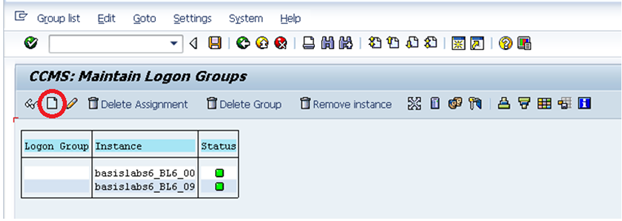
Logon to SAP system and goto SMLG transaction as shown below:


In the above example there are 2 instances (00 and 09) in this SAP system. These are not yet assigned to any logon group.

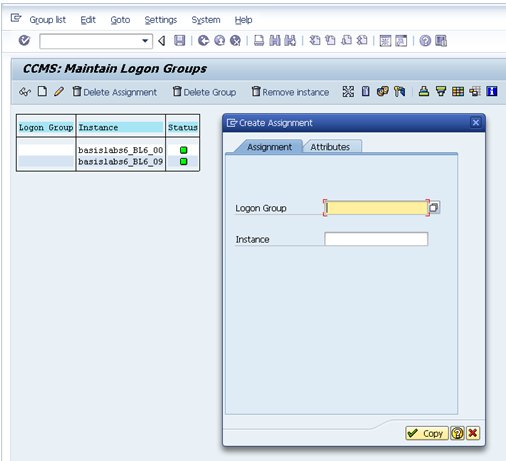
We can create a new logon group by clicking on highlighted create icon on the above screen. It results in below screen.


In the above screen, either select logon group from dropdown or provide its name if you are newly creating. After that assign instance for that logon group and click on copy to save the assignment.

In this example iam creating two logon groups hr and fico and assigning instances 00 and 09 respectively. Please find below screenshots which explains the same.


Repeat the same step and create logon group fico and assign instance 09 for it as shown above.

After doing this, you can see following logon groups in SMLG


Once you are done with logon group setup, please log off from SAP system and goto SAPGUI of the respective SAP system.


Click on properties of the respective GUI entry and goto to connection tab as shown below.


Please select Group/Server selection option from the drop down of Connection Type as shown above and maintain description and system id of the instance as shown above.

Now, you should be able to view the newly created logon groups as shown in below figure:


Also, please note you are able to view logon group SPACE also which gets created by default

Now, you can configure any desired logon group to the users as shown below:


For example in the above screen fico group is assigned to the end users in his GUI so that now onwards, he will login into instance number 09 only.

How to delete logon group or assignment?

If you no longer require any logon group, you can delete by proceeding as shown below:

i)Goto SMLG transaction

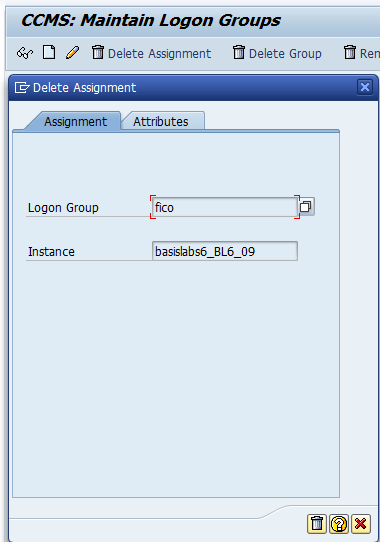
ii) Select the respective row and click on delete assignment which deletes the assignment of an instance to a logon group (highlighted in green color in below screen)


Click on delete icon above which confirms deletion of assignment

iii)If you wish to delete logon group itself, then select the respective logon group and click on “delete group” in the above screen highlighted in red color (please refer screen 1 of point ii above). This deletes the logon group itself and removes all assignments related to this group.

How to check logon load distribution in SAP?

Goto transaction code SMLG as shown below and click on highlighted icon below to view the load distribution across instances


Alternatively, you can view this by navigating to Goto -> Load Distribution or  by pressing F5 key in the above screen


Tuesday, 8 October 2013

Updated for Mac: FileMaker 2D Barcode Font Encoder

by Nate Schubert

2D Barcode Font Encoder for FileMaker on Mac

August saw the release of IDAutomations' highly-anticipated FileMaker Pro Plugin, a new font encoder tool that allows barcode generation from fonts in FileMaker. This powerful encoder is included in the Font and Encoder packages for Data Matrix and PDF417 and will soon be included in the font packages for QR Code as well. Initially updated for support on Windows operating systems, this most recent update makes it compatible with Mac systems for the first time.

Barcode fonts can be very easy to generate, but it is important to understand that barcode fonts do not operate in the same way that standard typeface fonts do. Since barcodes represent data that can be decoded and output when read with a barcode scanner, this means that the data must originally be turned into that barcode. This is accomplished through the use of a font encoder tool like the FileMaker Pro Plugin, which formats the data you want to encode into a special text string that will display an accurate barcode when the actual font is applied to it.

Update: Check out our newest video tutorial about how to create 2D barcodes in FileMaker 2 using fonts. It's still hot!

Friday, 4 October 2013

How to Secure Your Streaming Barcodes

by Nate Schubert

Hosted Barcode Image Generator Service

Security is an important concern on the internet, not only for companies that have E-Commerce and web sites intended to engage and interact with users, but also for web surfers who seek out community or other valuable content online. If a website is not properly secured, then any data that is communicated between the web site and the visitor can be intercepted by anyone who has the means to eavesdrop. 

When considering which facets of your web site to make secure, think about the role that barcodes play. For example, many E-Commerce checkouts include barcode images on the order form. In many cases, the data encoded therein consists of names, addresses, and possibly even credit card numbers. Many membership-based websites require private information like social security numbers, addresses or other personal data that may be stored in a barcode for easy, error-free entry into a database. If the information in these barcodes is not encrypted and secure, then your data may be on display for anyone who wants it.

There is an easy way to determine whether you are surfing securely on a web site. If the beginning of the web address (URL) starts with HTTP, then there is no encryption and if someone is looking for it, they can potentially see the information you enter. If the web URL starts with HTTPS, then your visit is secure and so is all of the information you may give a website, because the data is encrypted and hidden from any prying eyes. 

IDAutomations' Hosted Barcode Image Generator Service is fully HTTPS-compliant. This means that the custom URL sourced in your HTTP code can reference the URL as HTTP for public areas of your site, or as HTTPS for checkout and other sensitive places. This feature makes our service one of the most secure ways of transmitting information through barcode images on web sites, in email and in other applications that may reference a URL to display an image.

Low prices on Honeywell scanners

Feel the power: Honeywell special prices at Barcode Technologies


Benefit now from big savings on selected Honeywell scanners!* No matter which way you look at it - the price for these five hand scanners is scansationally low:
  • Bluetooth scanner Voyager 1202g*
  • Area imager Voyager 1400g*
  • Laser scanner Eclipse 5145*
  • 2D Bluetooth imager Xenon 1902g*
  • Industrial scanner Granit 1911i*  
* Offer valid until 31 December 2013 , for selected part numbers listed below.
1202g-2USB-5, 1202g-1USB-5, 1202g-2, 1202g-1, 1911iER-3, 1911iER-3USB-5, 1902gHD-2USB-5, 1902gSR-2USB-5, MK5145-31A38-EU, MK5145-71A47-EU, MK5145-71C41-EU, MK5145-71A38-EU, MK5145-31C41-EU, MK5145-31A47-EU, 1400g2D-2USB-1, 1400g2D-2USB, 1400G2D-2-07879K, 1400g2D-2, 1400G2D-1

Tuesday, 1 October 2013

Datalogic Introduces the QuickScan™ Lite QW2100 Linear Imager, the Best Choice for Entry Level Applications

 
Looking for a bar code scanner that can read long and truncated bar codes? Something inexpensive, but with the quality and performance to get the job done right? Meet the QuickScan™ Lite QW2100 linear imager, an entry level product from Datalogic that is perfect for use in retail, light manufacturing, document/bill processing and banking/finance environments.
 
This small, light and ergonomic linear imager offers:
  • Relatively long depth-of-field (DOF) to meet most application needs
  • Enhanced 60º field-of-view (FOV) generating an extra-long scan line to read longer bar codes in a nominal reading distance
  • Thinner and brighter laser-like scanning lines
  • Datalogic’s patented ‘Green Spot’ technology for good read feedback
  • Reads bar codes on mobile phone screens or computer screens
  • No moving parts and proven to be more reliable than laser scanning
The QW2100 imager also provides a variety of options. It is available with two interface possibilities: USB or Keyboard Wedge /RS-232 and includes various packaging alternatives so that it can be ordered as a scanner only or as a kit equipped with a scanner, cable and stand to facilitate hands-free reading options.

Friday, 27 September 2013

Better Safety and Security in Healthcare with Solutions from Zebra

Easily and accurately producing barcode labels in:

Strengthen safety and security with legible, barcoded patient wristbands and secure employee ID cards.

ZT200 Series Industrial Printers


Designed with ease-of-use in mind, the ZT200 Series offers reliable printing for a wide variety of applications. Whether you are adopting bar coding for the first time, upgrading your printers or replacing printer models, the ZT200 Series offers the right choice for most labelling applications.


High Performance Card Printers


The ZXP Series 7 is a robust, photo- quality card printer that delivers maximum performance. Ideal for high-volume applications, the Series 7 provides a full range of encoding and laminate options. Its high-capacity media provide both workflow and cost efficiency.

HC100 Wristband Printer

Easily print wristbands with a wristband printer designed for healthcare and hospitality.


2824 Plus Series Desktop Printers


Choose these desktop label printers when time and space are limited. Their compact designs and fast print speeds mean they’ll fit anywhere.


QLn Series Mobile Printers

Drop-resistant and lightweight, the user-friendly QLn mobile printers help you print barcode labels, receipts and more, wherever and whenever needed.

Wednesday, 25 September 2013

Are Barcodes Good for Business?

by Nate Schubert


Business owners and other decision makers are constantly evaluating products and processes to determine whether they would be a good fit for their business. If a proposed new process or component can provide benefits to a business in terms of increases in production or efficiency or lower operational costs, then it is likely that the process or component up for a consideration will be put into action. Of course, one of the major factors is also the cost of implementation-- is it going to generate more revenue than it cost to implement? How long will it take to recover the investment?

To Barcode, or Not to Barcode?

The question of implementing barcode technology has been asked at many businesses throughout the marketplace. Whether the proposed integration will prove to increase revenue or decrease operational costs is something that differs with each and every company that opts to put the technology into practice. However, there are some specific processes or procedures across the spectrum of industries where barcode integration is clearly a great decision...

  • Retail stores require that the manufacturers of the products they offer have UPC or Databar barcodes present on them. This allows for easy product identification and pricing information which can really speed up price checks and checkout. Further, the fast and easy record of product scans can be accumulated and analyzed to determine popular products, the impacts of lower (or higher) prices on certain products and much more.
  • ECommerce web sites utilize barcodes for a variety of reasons such as sales orders and return requests. This type of implementation allows staff to locate orders faster which increases response time and quality of customer service.
  • Shipping and receiving warehouses regularly scan the barcodes on their inventory to run up-to-date counts and keep tight control of their assets. Barcodes placed on packing slips may also be scanned to ensure that all items ordered have been picked and will be shipped to the customer. This type of increased command over shipping and receiving helps to keep costs down for returns and missing or stolen goods.
  • Advertising agencies have spent a great deal of time and effort looking for ways to incorporate 2D barcodes into promotional materials and endeavors. This type of integration can be as simple as a barcoded coupon with an incentive to save on a purchase, or something as complicated as scanning a 2D barcode in a movie, television show or video game to go "deeper" into the storyline, plot, etc.

You may not be in the movie-making industry, and you may not be in control of a multi-million dollar ECommerce store, but there is undoubtedly a place in your business where properly-used barcode technlogy can save you valuable time and money. How does your business use barcodes? 

New from Barcode Technologies and Unitech - the MS912 series and MS920 pocket data collectors - available to order now at amazing low prices!


Consumer grade smartphones and tablets are getting more integrated within the mobile enterprise but they can't meet the productivity and ergonomic requirements for enterprise barcode scanning. Therefore Unitech introduces its 1D MS912 series and MS920 2D pocket imagers. The result is a new level of enterprise data collection and the ability to streamline,  error proof and simplify more business processes. The MS912 series and MS920 enable an enterprise to easily implement barcode scanning where traditional scanners are limited, such as size, mobility and even price. There is no need to impractically move your mobile device or tablet for scanning barcodes. Just enlarge your working area with the Unitech pocket sized imagers! Easy to deploy the MS912 series or MS920 with mobile applications. These Unitech pocket sized scanners are Windows, Android and Apple compatible. 


Standard version - The MS912 series enables an enterprise to easily implement 1D scanning where traditional scanners are limited, such as size, mobility and even price.

Memory version - The MS912M (memory version) provides additional support to store data in a buffer mode when your device goes out of range

Standard 2D version - This device offers the mobile enterprise scanning and transmitting 1D or 2D barcodes at the fullest. Its aggressive performance enables the capture of damaged, coloured, overlaid and poor quality barcodes. The MS920 supports standard buffer and batch mode.