Zebra Plastic Card Printers.

Zebra Plastic Card Printers come in a variety of styles and price ranges, including single-sided printers, dual sided printers, and security printers

Healthy Solutions for Healthcare.

The healthcare industry benefits from barcoding. Barcoding enhances patient safety and operational efficiency.

Seagull Scientific Products

Seagull Scientific BarTender is an industry-leading label design and barcode software. Seagull Scientific also develops true Windows printer drivers for bar code and thermal printers.

MC 9190G

The Ability To Satisfy Your Company Software Requirements.

Wireless Broadband

The unrivalled Motorola portfolio of Point-to-Point (PTP), Point-to-Multipoint (PMP), and Mesh Wide Area Network (MWAN), WLAN and VoWLAN solutions make governments, enterprises, and service providers more agile by helping them deploy voice, video, and data applications right where they need them.

Wednesday, 18 April 2012

How to publish logon page message in SAP ?


 This article answers the following queries :
  • How to publish logon page message in SAP ?
  • How to customize SAP logon page ?
-------------------------------------------------------------------------------------------------------


Sometimes it is required to publish some informational message at the logon page of
the SAP (eg: To inform end users about the system details like SID, system refresh date, system availability, Basis support window, clients available, welcome message etc). Please follow below process to achieve the same.


Please login  to ABAP stack of SAP system and go to transaction code SE61.
A screen similar to below appears.


Please provide “ZLOGIN_SCREEN_INFO” as the data element in the above screen.
Click on Change button to modify the existing login screen information. If it is not already defined, please click on create button to create one.
It results in a blank screen as shown below.


Please type in the text that you wish to be displayed in the login page of the SAP system and save.
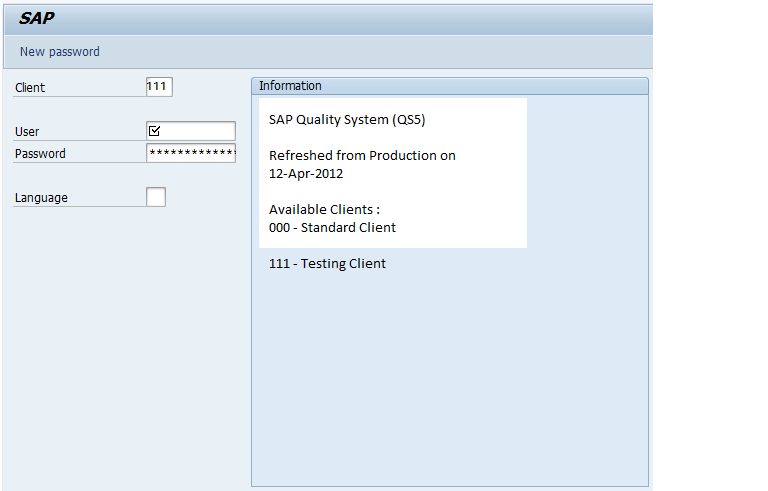
Once you log off from SAP system and check whether you are able to view the information message in the login page of the SAP system as below.






How to update SAP Splash screen?


This article answers the following queries :
ü  How to update SAP Splash screen?
ü  How to personalize SAP system via splash screen?
ü  What is SAP Splash screen in SAP ?
ü  What is the Tcode used to maintain SAP splash screen ?
ü  Why is it required to change SAP splash screen ?
ü  How to upload a .gif file in SAP to update Splash screen ?
--------------------------------------------------------------------------------------------

SAP Splash screen is a .gif file containing a picture which is used to personalize an SAP system.
It is often required to personalize an SAP system for informational reasons  by uploading logo (.gif file) of SAP Project name or SAP system details etc. Usually this will be done after a new SAP system installation or after a system refresh activity.
Please find below process on how to update SAP splash screen:
Execute transaction SMW0 and select “Binary data for WebRFC applications” as seen below


Click on highlighted button, which results in below screen


Click on execute button which results in below screen


Select the create button as shown above which results in below screen


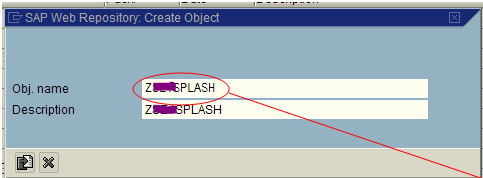
In the above screen, please make sure you enter object name and its description. Please note the Object name should begin with Z to indicate this belongs to customer name range. Once these details are provided, please click on import button, which results in below screen


Please navigate and select the appropriate  .gif file (i.e. logo ) which you would like to personalize and  display. Once this is selected, it results in below screen.


Please click on highlighted “local object” button.

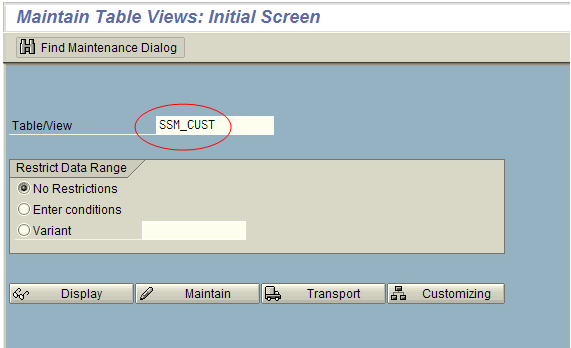
Once this activity is performed go to transaction SM30 to maintain a table SSM_CUST


Select Green check which results in below screen.


As shown above, please set new value to the START_IMAGE and save. This will prompt for a transport request as below.


Select create button and please make sure to indicate this is splash screen related  screen and do not transport this.

Now the splash screen updation settings are completed. Please log off from the SAP system and login again to view the personalized screen in the home page

Tuesday, 17 April 2012

How to check table size in SAP?


This article answers the following queries

ü  How to check table size in SAP?
ü  How to check view size in SAP?
ü  How to find out number of rows in a table in SAP?
ü  How to view indexes on a table in SAP?
ü  How to view index statistics of a table in SAP?
ü  How to find out on what columns indexes are built on a SAP table?
ü  How to find out on which date index statistics are last run for a SAP table?

---------------------------------------------------------------------------------------
Please login to SAP system and goto transaction DB02 or DBACOCKPIT


Please navigate to Space -> Single Table  Analysis, It results in the screen similar to below screen


Please provide the Table/View name for which you would like to determine the size.
In this example, am checking the size of a table RSBERRORLOG. Please provide the table name and press enter which results in below screen


As visible in the above screenshot, from the overview tab, we can view following details:
Reserved size(KB) -  Total size of the table allocated in KB
Data size (KB) – Current data size of the table in KB
Index  size (KB) – Current size of the indexes of the table in KB
Unused size (KB) – Amount of space unused in the table in KB
Rows  - Number of rows present in the table

Please  click on indexes tab of the above screen, to view a screen similar to below screen


It displays Index names and the columns on which indexes are built, size of index and the last update statistics for the indexes


Monday, 16 April 2012

The Secrets to Effective Window Displays

One Step Retail Solutions Associate member, Linda Cahan of Cahan&
Company was featured in this recent MSNBC segment on store window
design.

This segment is informative and we hope that our retailers will take a
few minutes to get some helpful tips and continued education on this topic.

Linda Cahan consults retailers regarding New Store Design, Visual
Merchandising, Branding and Renovations. An expert in the retail design
industry since 1971, Linda is well experienced in visual merchandising for
traditional department stores and specialty stores.


We are proud to have such fantastic resources made available
to our retailers through our associate program.
http://onestepretail.com/retail/recommended/listing/?c=cmV0YWlsLWRlc2lnbi0,

How to download SAP kernel

This article answers the following queries :
  • How to download SAP kernel ?
  • What is the process to be followed to download SAP kernel?
  • What is the best practice for SAP kernel upgrade?
-------------------------------------------------------------------------------------------------------

SAP Kernel can be downloaded  from Service Market Place(SMP).
To download SAP Kernel, login to SMP and goto Software Downloads -> Software Downlad Center.  From there please navigate as below
Under Support packages and Patches, navigate to My Company’s Application Components -> My Company’s Software


Click on  "My company's software"  link to view  all the company’s software that is available as below:


From the above list, please select your software for which kernel upgrade to be done example : SAP Netweaver PI or SAP Netweaver or SAP SCM or SAP R/3 or SAP R/3 Enterprise etc)

In the below example am selecting SAP Netweaver as my software and proceeding further


In the above list, select the correct version of software for which you would like to download kernel. In this example, am selecting “SAP EHP1 FOR SAP NETWEAVER 7.0” and proceeding further.

Note : The current software version can be identified from SAP ABAP System’s menu. Please navigate to   System  -> Status. After under SAP system Data tab, by clicking  Component Version/Component details you can view the version of the software.

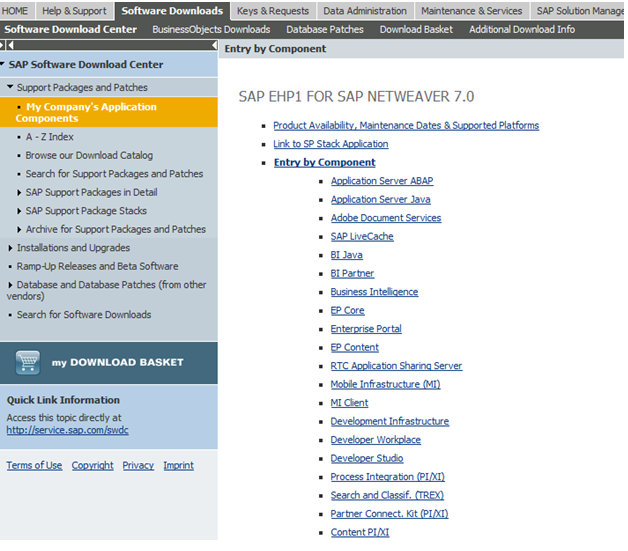
After selecting software, select Entry by Component link as below

It lists components as below :


Please select Application Server ABAP in that list and proceed further. It leads to below screen.

Please select the appropriate kernel from the list based on your SAP system setup like 32 / 64bit , Unicode/NonUnicode, Operating system on which your system runs :


After this click on #Database independent link as above to view below screen


Select the kernel patch which you would like to download and click on Add to Download Basket tab. This results in below screen

Next in the above screen, click on database in which your sap system is running. In my case, am selecting MS SQL server as the database and proceeding further.


 In the above list select the kernel patch which you would like to download and click on “Add to Download Basket”. Once you click this button, a screen similar to below will appear


Click on download basket pushbutton which displays screen as below:


In the above screen, click on the above items and save these files in your local desktop and later transfer these files into the desired server in which you would like to perform kernel upgrade.

Best practice is to download N-1 kernel patch from the Service Market Place. It means if the current kernel patch is 176 and the prior kernel patch is 150 and if you are in a lower kernel version (for ex: 124 etc), it is better to upgrade to N-1 kernel patch i.e. to 150 instead of upgrading directly to 176.  The reason for this is sometimes upgrading to latest kernel may lead to some issues like performance problems, system startup failure etc. To avoid this, it is suggested to apply N-1 kernel patch.


Friday, 13 April 2012

Retailers and Pinterest: Tips and Examples

Big box stores are starting to really capitalize on Pinterest.
I have always envisioned this as a tool for indie retailers.
I have taken as a personal mission of mine, to help
retailers maneuver the sometimes overwhelming waters.
I hope this information helps you.
-
1) Create a Pinterest board that enhances your customers
experience with your company.
Example: Lowes (hardware, home improvement) has
created not only a full Pinterest profile but a "Craft Ideas"
board which features dozens of fun DIY projects using
their products. You can find everything from necklaces,
home decor, games for kids and organizing projects.
-
2) Adding Pinterest "pin" buttons to your items in your
online store.
Example: Sephora and Amazon recently put this concept
into place and Ebay announced their upcoming
implementation.
-
3) Creating and maintaining a Pinterest board to
increase familiarity and interactions with your current
and future clients.
Example: Lowes is an excellent example, their boards
are not only in place but they are creating new and unique
ways to use Pinterest to increase their interaction and
usefulness to clients.
Retailers could (and do) include products pages,
which is currently somewhat frowned upon as
"self-promotion". A way to side step being "one
sided" is to create "looks" and inspiration for the
coming seasons pulling from more than just your
catalog of pieces. "How to wear" and "must have's
for the Spring" could position your board as
go-to inspiration for your demographic.
-
4) If you are a retailer that is brick and mortar without
a eCommerce site in place consider starting a blog
where you host your images and include some fun looks
and tips. Pins will then be attributed to your shop as the
source and you can increase traffic even if you are a
smaller one location shop.
This is a newer platform that has not been fully developed,
the sky is truly the limit so you should feel more than free
to be creative and original.
Example retail blog:
Crossroads Trading Co http://crossroadstrading.com/
-
Happy Pinning!
-
Amy Hanson

Tuesday, 10 April 2012

Now Available: New Linear Barcode Scanners

by Nate Schubert

IDAutomation strives to meet the needs of our clients on every side of the spectrum. From barcode generation fonts, components and stand-alone applications to barcode scanners and printers, our high-quality selection of products and rich base of product tutorials and documentation provides customers with a deep resource to rely on during projects that integrate barcode technology in some form or fashion. In an effort to provide our customers with access to the most current and up-to-date technology, we have added a variety of hardware devices to suit many needs throughout a variety of fields. Following are some of our most notable linear barcode scanner additions to our expansive selection of quality barcode scanning and printing products.

Linear (1D) Barcode Scanners
While linear barcode scanners are traditionally more affordable than others, they do offer limited functionality in terms of their ability to read only linear barcodes such as Code 128, Code 39, UPC and others. These are corded models which means they must be connected to the computer for power and communication.

  • Hyperion 1300g Linear Imaging Scanner
    • Dependably scans up to 18" away from the barcode.
    • Reads standard 1D linear and GS1 Databar symbologies.
    • Includes Remote MasterMind Scanner Management Software.
    • Available in USB and Keyboard Wedge (PS2) connection (USB recommended)
    • 5-year Factory Warranty.
    • Priced from $139 with Free Ground Shipping.
  •  Honeywell Voyager 1250g Barcode Scanner
    • Dependably scans barcodes as wide as 13mil from up to 17.6" away.
    • Reads standard 1D linear and Gs1 Databar symbologies.
    • Available in USB and Keyboard Wedge (PS2) connection (USB recommended)
    • 5-year Factory Warranty.
    • Priced from $115.00 with Free Ground Shipping.
Purchase of these products also allows a license to the Free Barcode Font, Barcode Label Software and Barcode Scanner ASCII String Decoder. These free products support medium size Code 39 barcode generation. We also offer a range of other affordable, high-quality linear barcode scanners to suit your needs in the event that these do not.


Wednesday, 4 April 2012

Shift4 Was Not Impacted by Global Payment Breach

Shift4 reports that they have not been affected by the
Global Payment breach.

A Shift4 representative notes that they surmise an
organization had access to some form of reporting
portal provided by Global Payments – perhaps one of
their ISO’s specializing in the car parking space
provided a path into a limited area of Globals
infrastructure.

It is also noted that unfortunately it takes some time for a
comprehensive report to hit the media leaving retailers to
speculate and at times causing undue alarm.

One Step Retail Solutions message to retailers is to:
a) Get educated and
b) Ensure that a layered approach is taken and that you
have all PCI compliancy points not only put into place but
updated and reviewed regularly.

http://onestepretail.com/Products/SecuritySuite/

Tuesday, 3 April 2012

"Massive" CC breach and How They Hack You

You may start getting questions about a very recent
"massive" CC security breach. Unfortunately, there are
currently little specifics as to who all will or has been
affected by this situation. We are and have been keeping
our finger on the pulse as the information comes in.

We have put together a short gathering of information
related to this that should shed some light on what
happened, what is being done about it and who has mostly
been affected.

Stay tuned for upcoming specifics and hopefully a list of
which processors have been affected. Please feel free to
reach out to your own processor as you see fit.

We will be sure to back any statement with factual data
and sources to avoid any continued or unncessary worry
or fear.
-
-
How to Tell if You Have Been Caught in the Fraud:
The part of the process that was breached was the step
between the merchant and the processor; the former
being a New York City taxi and parking garage company,
Payments apparently first identified the potential breach in
early March, and the problem had been undetected for
several months before that.
Therefore, the pool of victims is likely to be those who
used their debit or credit cards for transportation in the
New York metropolitan area earlier this year.
-
"Massive" credit card card breach:
http://cnnmon.ie/massivebreach
-
How Big is the Theft?
"Most payment-card thefts, the Verizon study found, are
from small businesses, with only about 5 percent last year
from large organizations. More than three-quarters of the
breaches involved losses of fewer than 10,000 records. Just
seven breaches involved more than 1 million records each.”
-
Related article on "How They Hack You":
--
As retailers you should absolutely ensure your own end
is fully covered and secure.
In addition, stay in the know regarding imminent dangers
to yourselves and your clients.

Monday, 2 April 2012

Interview with an Associate Member - Rich from Plastic Resource

We are going to start periodically interviewing associate
members so that you can become more familiar with the
large retail service provider network we have established
over the past year.

Our first interview was conducted on Mr. Rich Junker of
Plastic Resource. Richard has worked in the gift card
printing industry for over 5 years, while Plastic Resources
has been in business for over 15 years and boasts over 100
years of combined experience in custom printing and design.

What is your favorite color:
Pantone 343 –hunter green

If you could offer any advice to retailers out there,
what would you say?
Make it easy on yourself, know your data from the
beginning, you’re the one that will ultimately have to run
the system or program.

What kind of cards and products are available
from Plastic Resources?
Loyalty cards, custom cards, business cards, gift cards,
phone cards, key tags, membership cards and card
carriers.

If you were a retailer, what do you think your
favorite part of your day would be?
Counting receipts from gift card sales.
What is your favorite meal?
Is there anything other than pizza?

Do you have any hobbies?
My kids, they’re doing everything I wish I could have
done more of.
Do you have a secret super powers or abilities?
I seem to have this incredible ability to repel fish away
from me wherever I am. The large ones anyway, I can
catch bait fish and salad (weeds) no problem.

What is your favorite climate?
Still investigating. I’ve not traveled to a tropical island
yet. I’m working on a way to disguise the sounds of the
beach to be able to work, “remotely”.

Name: Rich Junker
Position: Sales Representative
Company: Plastic Resource Inc.
What state are you in:
Minnesota (At this time there’s no comment about the Vikings).
Company link:
http://www.plasticresource.com/
For more information on our associate members, please