Zebra Plastic Card Printers.

Zebra Plastic Card Printers come in a variety of styles and price ranges, including single-sided printers, dual sided printers, and security printers

Healthy Solutions for Healthcare.

The healthcare industry benefits from barcoding. Barcoding enhances patient safety and operational efficiency.

Seagull Scientific Products

Seagull Scientific BarTender is an industry-leading label design and barcode software. Seagull Scientific also develops true Windows printer drivers for bar code and thermal printers.

MC 9190G

The Ability To Satisfy Your Company Software Requirements.

Wireless Broadband

The unrivalled Motorola portfolio of Point-to-Point (PTP), Point-to-Multipoint (PMP), and Mesh Wide Area Network (MWAN), WLAN and VoWLAN solutions make governments, enterprises, and service providers more agile by helping them deploy voice, video, and data applications right where they need them.

Thursday, 21 July 2011

Oracle Background Processes


This article answers the following queries :

  • What are the different background processes of oracle database ?
  • What are the functionalities of different background processes of oracle?
  • What is dirty buffer ?
  • What is cold buffer?
  • What is write-ahead-logging ?
  • How to list or view the different background processes of oracle ?


Background processes are created from the oracle binary when an instance is started.  As the name suggests background processes run in background and they are meant to perform certain specific activities or to deal with abnormal scenarios that arise during the runtime of an instance.

From SAP perspective,  the following are the 6 most important background processes of oracle database.

Database Writer (DBWR) :

The database writer writes dirty blocks from the database buffer to the datafiles.

Dirty blocks need to be flushed out to disk to make room for new blocks in the cache. When a buffer in the database buffer cache is modified it is marked as dirty buffer. A cold buffer is a buffer that has not been recently used according to the least recently used (LRU) algorithm. The database writer writes cold, dirty buffers to disk so that new blocks can be read into the cache.

The initialization parameter DB_WRITER_PROCESSES specifies the number of database writer processes. The maximum number of database writer processes is 20.

The database writer writes the dirty buffers to disk under the following conditions :

  1. When a checkpoint occurs
  1. Every 3 seconds
  1. When a server process couldn’t find a clean reusable buffer after scanning a threshold number of buffers

Log Writer (LGWR) :

The log writer process writes data from the redolog buffers to the redolog files on disk.

The redolog buffer is a circular buffer. When LGWR writes redo entries from the redolog buffer to the redolog file, server processes can overwrite the  entries that are already copied with new entries in redolog buffer. LGWR writes at a faster pace so that space is always available in the buffer for new entries.

The log writer gets activated under the following conditions :

  1. When a transaction is commited
  1. Every  3 seconds
  1. When the redo-log buffer is 0ne third full
  1. When a database writer writes modified buffers to disk, if necessary
Note : Before database writer can write dirty blocks to disk it should make sure that all redo entries are written from the redolog buffer to the disk. This is also known as write-ahead logging. If database writer finds that some redo-records are not written, it signals LGWR to write to disk and waits for LGWR to complete writing the redolog buffer before it can write out the databuffers.

Checkpoint (CKPT) :

Checkpoint signals the synchronization of all database files with the check point information. It ensures data consistency and faster database recovery in case of a crash.

The checkpoint process regularly initiates a checkpoint. Whenever a check point occurs following things are carried out  :

  1. Updating the file headers of the data files with information about the last checkpoint performed
  1. Update control files about the last checkpoint
  1. Initiates LGWR to flush the redolog buffer entries to redolog files.
  1. Writes the checkpoint record to the redolog file
  1. Initiates DBWR to write all dirty blocks to disk and thus synchronizes database

Archiver Process(ARCH) :

The archiver process copies online redolog files to the designation archive log location after the occurrence of a log switch. It is an optional process. Archiver is present only when database is running in archive log mode and automatic archiving is enabled.

You can specify multiple archiver processes with initialization parameter LOG_ARCHIVE_MAX_PROCESSES.  ALTER SYSTEM command can be used to increase or decrease the number of archiver processes.

However it is not recommended for us to change this value, as Log writer starts a new archiver process automatically when the current archive processes are insufficient to handle the workload

Process Monitor (PMON) :

The process monitor performs process recovery when a user process fails. PMON is responsible for cleaning up the database buffer cache and freeing resources that the user process was using like releasing locks, removing process ids from active processes list etc.

PMON checks the running status of dispatcher and server processes periodically and restarts in case any have stopped. Please note that this won’t start processes that are intentionally stopped by Oracle.

PMON also registers information about the instance and dispatcher processes with the network listener.

PMON wakes up every 3 seconds to perform house keeping activities and should be running always for an instance.

System Monitor (SMON) :

The system monitor performs instance recovery, if necessary, at instance startup. SMON is also responsible for cleaning up temporary segments that are no longer in use and for coalescing contiguous free extents within dictionary managed tablespaces.

SMON can be called by other processes in cases of need. SMON wakes up every 5 seconds to perform house keeping activities. SMON must always be running for an instance.
           

Query to view background processes of Oracle :

Goto SQL prompt of oracle database system and provide following command to view background processes.

SQL>

Select * from v$session where type =  ‘BACKGROUND’;


Enter your email address:

Delivered by FeedBurner


Wednesday, 20 July 2011

SAP Web Dispatcher and its functions

This article answers the following queries :

  • What is SAP Web dispatcher ?

  • What is Demilitarized zone (DMZ)?

  • What are the advantages of DMZ ?

  • Where does SAP Web dispatcher runs?

  • What are the functions of SAP Web dispatcher ?


SAP WEB DISPATCHER :

SAP web dispatcher is used to distribute web requests.  It is based on the same technology as SAP ICM(Internet Communication Manager).

Please note that apart from web dispatcher, web requests can also be distributed through message server or ICM. However, these have only limited functionality and some disadvantages and is therefore not recommended by SAP.

SAP web dispatcher is the SAP recommended process/method of distributing web requests as it has some advantages and additional functionality.


Demilitarized Zone (DMZ) :

In computer networks, a DMZ is a computer or a small network inserted as a neutral zone between  a company’s private network and the outside public.
It prevents external  users from directly accessing the company’s server and thus provides security.

In SAP scenario, DMZ is a neutral zone inserted between internet and  SAP Netweaver Application server so that external users from internet cannot directly access  SAP netweaver application server.

SAP Web Dispatcher runs within the DMZ


Functions of SAP Web Dispatcher :

  • Distribution of  requests to both ABAP or Java application instances

  • Denial of unwanted requests  (i.e. request filtering)

  • Buffering of web requests

  • Ensures that customers can access the SAP system via one address

  • Provides security as it runs in DMZ (Demilitarized zone)

  • Handles distribution of both http and https requests.


Enter your email address:

Delivered by FeedBurner


Tuesday, 19 July 2011

SAP STANDARD APPLICATION BENCHMARKS


This article answers the following queries :

  • What is the SAP Standard Application benchmark?

  • Benefits of benchmarks ?

  • What is the full form of SAPS ? How SAPS  is derived ?

  • What is SAPS ?  How to calculate SAPS ?

  • How is SAPS defined ?


---------------------------------------------------------------------------------------------

SAP standard application benchmarks are the standards developed by SAP along with their hardware partners to help customers and sap partners to figure out the appropriate hardware configuration for their IT landscape.

The benchmarking process is standardized and well defined and is monitored by the SAP benchmark council and technology partners who are involved in the benchmarking.

This benchmarking is used to test and verify

  • Quality assurance

  • Scalability

  • Concurrency

  • Power efficiency

  • Multi user behavior of system software components

  • RDBMS

  • Business applications


Benefits of benchmarks :

The primary objective of benchmarking is to use the results to determine an optimal SAP system hardware configuration

Benchmark results provide following benefits to customers:

  • Provide useful information to configure and Size SAP systems for optimal performance

  • Facilitates customers for Comparison across different platforms

  • Provides an outlook for future performance levels

  • Enable proof of concept scenarios


SAP internally uses these benchmark results to figure out the performance or memory consumption of a new products developed.


SAP Application Performance Standard(SAPS)

Full form of SAPS is SAP Application Performance Standard

SAPS is a hardware-independent unit of measurement which describes the performance of a system configuration in the SAP environment. It is derived by SAP from the Sales and distribution(SD) benchmark.

“SAPS is defined as 2000 fully business processed order line items per hour.”

In technical terms(as per SAP definition), this throughput is achieved by processing 6000 dialog steps (screen changes), 2000 postings per hour in the SD benchmark or 2400 SAP transactions.

As per SD benchmark, fully business processed means the full business process of an order line item like creation of an order, creation of delivery note for an order, changing the delivery, posting a goods issue, listing orders and creating an invoice.


Enter your email address:

Delivered by FeedBurner

Update! Barcode Maker Software for QR-Code vCards and More

vCard Data Import
Check out this post to learn more about the new features of Barcode Studio V11.6.

With Barcode Studio you quickly create high-quality bar code images for pre-press requirements and desktop publishing applications. More than 100 different linear and 2D codes are supported by this software!

The new release focuses on bar-code creation for mobile tagging with vCard and meCard QR codes and provides enhanced label printing features.

Features and Enhancements in Detail

QR-Code vCard Assistant
  • Mobile Tagging
    2D codes for mobile tagging are now using the lowest possible error correction level. This minimizes the size of the generated barcodes.
  • Intelligent Data Import
    It is possible to import predefined data formats for vCard, vCalendar, meCard, etc. in a structured way. This is especially helpful for mass-creation of business card bar-codes.
  • Copy Counter for Label Printing
    The user can specify how many identical copies of a single label should be printed.
  • ISBN / ISSN / ISMN
    The data assistant now makes it easier to enter codes in ISBN, ISSN, and ISMN format.
  • Pixel Shaving
    For 2D codes like QR-Code or Data Matrix, the pixel shaving algorithm was improved.
  • Appearance
    The appearance of several dialogs was improved.

Bug Fixes

  • Label preview crash was fixed.
  • The check for the bar code sizes was improved.
  • Fixed the wrong display of the number of errors in the data list.

Free Trial with 10 Days Unlimited License

Demo downloads are available for Mac OS X and for Microsoft Windows. Check them out today!
Barcode Studio for Mac OS
Barcode Studio for Microsoft Windows
The above downloads are FINAL releases (as of 07/25/2011) - have fun!

About TEC-IT

TEC-IT Datenverarbeitung GmbH provides high quality software in the areas of bar-coding, barcode extensions for ERP systems, label and form printing, reporting and automated data acquisition. TEC-IT products are available for all major platforms, thus customers benefit from complete and versatile software solutions for all possible requirements. The company is located in Austria / Europe and can be reached via www.tec-it.com.
All trademarks are the property of their respective owners.

Monday, 18 July 2011

3 Easy-To-Use Barcode Generators

by Nate Schubert

There are a lot of different ways in which barcodes can be generated. From barcode fonts which require special encoders, to components which allow more powerful barcode generation within specific environments, to full-powered, stand-alone applications. It can be overwhelming to determine which method of barcode generation will best suit your needs, but there are a few excellent choices that stand out as the easiest barcode generators to use.

Code 39 Barcode Fonts

Code 39 barcode fonts are the easiest type of font to use when generating a barcode because the only formatting they require is an asterisk (*) at the beginning and end of the data. Then, simply highlight the data (with asterisks) and select the appropriate Code 39 font to turn that text into a readable barcode. Virtually every other barcode font type requires much more complex formatting in order to display a readable barcode, which makes Code 39 an excellent choice over others.

Barcode Image Generators

The IDAutomation Barcode Image Generator is a stand-alone application that is used to create barcodes in image formats like jpg, png and others. These barcode images can then be copied and pasted into other Windows applications, or uploaded to a web server for display on a web site, or used for anything else than a standard image may be used for. This barcode image generator software can create individual images, or multiple images very quickly, and effortlessly.

Barcode Label Software

While many barcode generation components or fonts can be used within existing applications to display barcodes for printing onto labels, the IDAutomation Barcode Label Software is a label design editor that is specifically geared toward generating barcode labels. This software product has a long list of pre-defined custom label stock, and also allows for custom dimensions to be set. Also, the application can be linked to an external database to draw data from, and print onto barcode labels. This is a high-powered barcode label software that is very easy to use, whether for printing individual barcode labels or large amounts of barcode labels.

Depending on your specific need, there may be other products that are more specialized, or more affordable, or allow for greater developer production. The above products are certainly some of the easiest to use in the barcode industry, but it is always a good idea to consult the expertise of a sales or technical support representative with IDAutomation before completing your purchase.

Friday, 15 July 2011

Guidelines for activating a Performance trace

This article answers the following queries :

What are the guidelines to be followed for activating a performance trace ?
 
 Guidelines for activating a Performance trace
 
  1. If you are tracing a particular activity of a user, please make sure that the particular user is not performing any other activity in the system. Otherwise trace file will be difficult to analyze. For reasons of simplicity, please request user to perform only one activity while the trace is activated.
 
  1. Please make sure that no background jobs or update processes are running in that SAP for  that particular user whose activity is being traced. Otherwise trace won’t be clear

  1. By default, SQL trace is selected in ST05 transaction. Incase you would like to trace others( like RFC trace, buffer trace)  please activate them also.

  1. Normally we are interested in the buffer load processes that get recorded while tracing an activity through SQL trace. Therefore, it is suggested to execute the program or activity that is to be traced once before actually tracing it so that all the buffer loads processes will happen. In the next run, since buffers were already loaded SQL trace doesn’t capture un-necessary details related to buffer load which makes it easy to analyze the trace.

  1. In cases of distributed SAP system, where there are number of application servers  then you need to activate the trace in the particular application server where the user is performing the activity. In other words, trace won’t get recorded if you activate trace in one application server and user is performing the activity in another application server.

  1. If you would like to record a trace for background job or for an update request in a distributed SAP system, it is suggested to activate the trace in all the application servers that are present in the SAP system. This is required because you will never know to which application server the particular request goes for execution.

If you are tracing an activity of any other user you can look at following monitors during the trace :

  • Workprocesses overview (SM50/SM66)
  • Operating system monitor of Database server to identity any CPU bottlenecks in database server)
  • Database process monitor for monitoring the execution of SQL statements


Profile parameter settings for Performance Trace (ST05):

Please note that trace cannot be taken for very long duration as the size of the trace file is limited as set by SAP profile parameter. When the trace file is full, the oldest entries are deleted or overwritten by the newest entries i.e. writing to the trace file is cyclical.

The SAP profile parameter rstr/max_diskspace is used to set the size of the trace file in a SAP system. The default trace file size is 16MB

For a trace file, default file name also can be set using the SAP profile parameter rstr/file.

Enter your email address:

Delivered by FeedBurner


Wednesday, 13 July 2011

5 Reasons to Use Code 128 Barcode Fonts

by Nate Schubert

It can sometimes be a challenge to determine which barcode type will best suit the needs of your business process or procedure. Different barcode types may have different capabilities. For example, Code 39 is a symbology that allows printing of upper-case letters and numbers, where Code 128 fonts allow both upper and lower-case letters, numbers, ASCII characters and functions. To take it one step further, 2D barcodes such as Data Matrix or QR Code can encode upwards of 800 characters of information of all kinds, from standard data, to web links, and even vCards in the case of QR. So, why choose Code 128?

Code 128 A, B, C and Auto
Code 128 is divided into three distinct character sets A, B, C and Auto which utilizes a combination of the previous three sets. Code 128 A encodes special characters as well as ASCII characters 00 to 95 which consist of the numbers 0 through 9, upper-case A through Z and control characters. Code 128 B encodes special characters as well as ASCII characters 32 to 127 including numbers 0 to 9 and both upper/lower case letters A to Z. Code 128 C encodes FNC1 in addition to ASCII characters 00 to 99 for double density encoding of numeric-only data.

Many Code 128 Barcode Font Encoder Tools Available
Code 128 is a relatively complex symbology, and the process of generating a barcode from a font is not quite as simple as simply typing the data you want to encode, highlighting it and selecting the appropriate font. It may look like a barcode, but it will not be ready by any barcode scanner. Because of this issue, IDAutomation barcode fonts come with a wide variety of font encoder tools that automatically format your data into a text string that will generate a readable barcode, once the font is applied to it.

Code 128 is the Basis for Other Standards
An added-benefit to Code 128 is that this barcode type can be utilized to generate a variety of different standards such as GS1-128, ISBT-128, USS Code 128, ISS Code 128, GTIN, SCC18, EAN-128, USPS SISAC, Canada Post and other specifications based on the Code 128 symbology. In most cases, simply creating a barcode according to your specific standards is all you need to do.

High-Density Code 128 Barcodes
Code 128 barcodes have a higher density than other barcode types such as Code 39, which means that a Code 128 barcode containing the same data as a Code 39 barcode will be smaller, taking up less space on your document, mailing piece or other material. This can be critical in situations where space is an issue.

Code 128 Barcodes are Common
Perhaps the most significant reason to go with Code 128 when making your barcode decision is the fact that these barcodes are among the most popular types around. Because of this, just about any barcode scanner is going to be capable of reading Code 128 out of the box. Moreover, there is a lot of information available about Code 128 for the purpose of troubleshooting, because it is popular and thus many people are using it.

Code 128 isn't for everyone, but it certainly is the right choice for a great many scenarios. We've only explored 5 of the most well-known reasons for choosing Code 128 over another barcode type. Feel free to leave a comment with some other reasons why Code 128 may be the right choice!

SAP Netweaver Interview questions with answers - set 4

This article provides the 10 most important SAP Basis interview questions covering SAP, Database and operating system areas. 

Have updated answers for some of the questions. For rest will update as soon as I write relevant article on the same.

----------------------------------------------------------------------------------------------


1.  A user complaints to you that a background usually takes 3hrs to run but it is already 6hrs completed and still the job is running. How to analyse the issue ?

Answer :  Troubleshooting longrunning jobs 
              
                  Identifying long running jobs

2. Do you have experience in handling SCM system? If yes, how to you start or stop livecache in SCM or APO(Advanced Planning and optimiser) system ?

Answer:  Yes, I do have experience in handling SCM system. Livecache can be started or stopped using LC10 transaction code.

Related Link :    How to start or stop livecache in SCM or APO system?


3. If a java stack is down ? How do you troubleshoot ?

Answer:  Will update later

4. If in a java only system, administrator user id got locked, how do you resolve this issue ?

Answer:

5. How to create a server node in Java based SAP system ?

Answer: Will update later

6. In system refresh activity, database restoration is done and sap system is up. Now, what are the poststeps system refresh steps that you perform ?

Answer: Will update later
7. How do you analyze an expensive SQL statement ? 

Answer : Please go through below related links


8. What do you know about Wily introscope agent ? What is the use of wily introscope ? What is the version of wily introscope that you have implemented ?

Answer: Wily introscope is a java monitoring agent that is  installed in a high available system like Solution manager and all other satellite systems that are to be monitored are connected or configured. So, using wily introscope end to end root cause analysis can be done. In cases of performance issue of java systems, troubleshooting can be better done using wily introscope as it provides so many details related to memory consumption, CPU usage, system availability, paging, Garbaga collection details etc.

Wily introscope is available in different versions like  7.1 ,  8.0 and latest one 9.1


9. What is the transaction to perform support pack upgrade in ABAP stack ?

Answer:  SPAM is the transaction code used to perform support pack upgrade in ABAP stack.

10. Your SAP systems are based on which operating system ? What is the version of operating system do you use? 

Answer: For example, You can reply based on the operating system you are using like AIX operating system with version 5.3


Enter your email address:

Delivered by FeedBurner


Monday, 11 July 2011

QR Codes and Tattoos: Have I Died & Gone to Heaven?

A tattooed Frenchie named Marco got a marketing QR code inked on his chest. The QR is encoded with a URL, where an animated version of the tattoo sings. HOW AWESOME IS THAT? I'm planning my next tattoo as we speak.

Friday, 8 July 2011

Adding a SAP system to SMSY of solution manager system

This article answers the following query ?

How to add a SAP system to SMSY of solution manager system ?

Login to Solution manager system and goto SMSY transaction and navigate to Product Systems -> Create product system with assistant as below :


A separate window pops up as below, which assists in product system creation


Click on continue in the above screen to proceed further


In the above screen wizard pls provide product system SID, description, SAP product details, version and installation number and press continue to goto next step.


In the above screen, please select components which are relevant for your environment and press continue to proceed to next step


In the above screen, please system number and message server ip address and press continue to goto next step


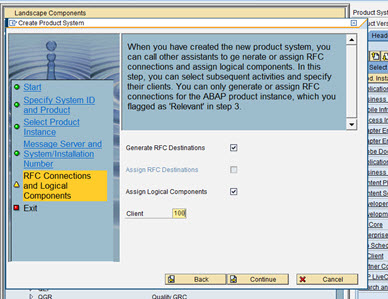
Select as per above screen and click continue to proceed to last step
Now new wizard opens for creation RFC connections. Please perform steps as mentioned in the screenshots below :


Click on complete to finish creation of RFC connections.
Now click on exit on the create Product system wizard also to complete the addition of an SAP system to solution manager system


Enter your email address:

Delivered by FeedBurner